1
Programmable Gain Amplifier User Manual
1
Welcome to the Programmable Gain Amplifier
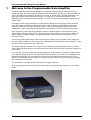
The Multi Channel Systems device PGA64 is an amplifier of analog signals with the option to
change the gain. The input signal amplitude can be increased from a factor of 10 up to 5000. The
gain is selectable by software and can be set for each of the 64 signal channels individually. The
main parts consist of the analog filter stages, of a logic part to set the amplification, of an
EEPROM to save the potentiometer settings, of a level converter accepting RS232 signals and of a
power stage.
The signals of the 64 input channels are amplified according to the frequency band. The band
filter the signals according to the frequency parts. The outputs are observable on the output
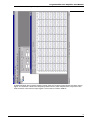
connector. Examples of output signals are given. A figure in the appendix demonstrates the
dependance of the output signal amplitude from the frequency for the used frequency band.
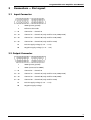
Input signals are connected using a 68-pin connector. Output signals are transferred to other
devices using a 68-pin connector, too. The pin layout of both connectors is given in a table. The
digital signals to change the gain are delivered using a 9-pin SUB-D connector via the serial
interface of a PC.
An internal power supply stage transforms the input voltages of any external power supply bin
into the supply voltages of ±3.0 V and ±5.0 V. The supply bin should deliver raw voltages of ± 6.0 V
at least, for connecting use 4 mm-connectors.
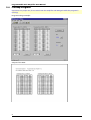
A software package installed on a computer with a Windows operating system makes it easy to
set the digital potentiometers to the selected values. Note: check the serial connection using a test
button first.
In a next step, the gain can be selected individually for each channel. Or use the pull-down menu
for a general setting. Push the download button and the values are written to an EEPROM in the
PGA64. Automatically, the new values are written into the digital potentiometers, too. If you
switch off the PGA64, the last setting of the potentiometers are stored. After switching on again,
these values will be restored.
An online Help is available and will explain the program functions.
During loading down the settings to the PGA, please, stop any running program or set to sleep
mode!
2