1
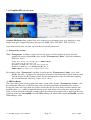
7.2.3 Graphics File Overlay Item
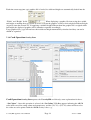
Graphics File Items allow graphics files to be displayed over incoming video or by themselves at the
output video ports. Supported graphics file types are .BMP, .JPG, .GIF, .PNG, .TIF, and .TGA.
Apart from the file name selection, this item has several new parameters:
(1) Transparency Colour
When “Transparent” checkbox is ticked, the overlay process will not display the pixels from the
graphics file whose colour RGB values and the “Transparency Colour” value have minimum
difference, that is:
abs(Rp - Rt) + abs(Gp - Gt) + abs(Bp - Bt) <= TKErrorRange;
where abs(X) is the absolute value of X,
Rp/Gp/Bp is the RGB value of the pixel on the graphics file,
Rt/Gt/Bt is the RGB value of the TransparencyKey Colour,
TKErrorRange is a value >= zero as supplied on the screen.
For example, when “Transparent” checkbox is ticked and the “Transparency Colour” set to “blue”
(RGB= (0,0,255)), a graphics file with people in front of a blue background will be displayed only
with the people over the incoming video, the blue background becomes invisible thus exposing
the video underneath, achieving a “blue-screen” effect.
(2) TKErrorRange
This value makes pixels on the graphics file whose colour values and the “Transparency Colour” value
have minimum difference as indicated above to be invisible(exposing the underneath video content).
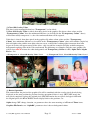
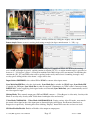
Setting this value to be larger than zero will be useful when the area to be made invisible contains nonuniform colour, e.g., a white background contains pixels with colours close to but not exactly the pure
white, as illustrated in the following example where the same overlay graphics file is applied on the same
video but on the left VoverlayHD card with TKErrorRange =0, while on the right VoverlayHD card with
TKErrorRange =220:
VoverlayHD Application User Manual
Page 12
Version 1.0.0.0