1
23
FEATURE MVTec_ActivMeasure mvtecd 3.2 permanent uncounted \
HOSTID=000ea62e7fa4 SIGN="8D65 03EB 10B7BF11 0C41\
8528 150E 5D5F E1B5 1090 E96A 7CCB 7E6C 8946 2F39 1056
C239 C46F E2F5 245B 3DF0 B9F9 893B 5E8E C22C 1C65 3B99
FEATURE MVTec_ActivDecision mvtecd 3.2 permanent uncounted \
HOSTID=000ea62e7fa4 SIGN="03EF A10E 6D69 67BB CAEA \
3F50 3CE5 F48E 9E1F B1DB 5E6B EE25 FBC2 BCB4 3A32 14B1
A211 34ED 1BFB 34C7 BD33 54BE 69CF F9CF 577F 8AA0 A5AA
Getting Started
2.2 Licensing
D711 DB3B \
AAE7"
B8D2 77B4 \
430C"
Figure 2.4: Permanent license keys, bound to a network board.
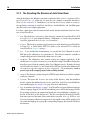
Installing the License File
After sending the ID to your distributor (or requesting a dongle) you will receive a license file
containing the permanent license keys for the requested tools. This file must be placed in the the
subdirectory license of the ActivVisionTools base directory and renamed to license.dat, if
necessary. Example license keys for ActivMeasure and ActivDecision bound to a network
board with the ID 000ea62e7fa4 are depicted in figure 2.4.
Note that if you use a dongle-bound license and move the dongle to another computer, you must
copy the license file to this computer as well!
!
If you upgrade ActivVisionTools to a newer version, your distributor provides you with a new
license file, which contains the new license keys. This new license file should replace the old
one.
ActivVisionTools 3.2 – Your Fast Track to Solutions