1
2-4. LED Indicators
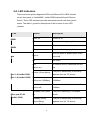
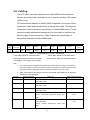
There are some system diagnostic LEDs and Ethernet Port LEDs located
on the front panel of JetNet3008 / JetNet 3008f Industrial 8-port Ethernet
Switch. These LED indicators provide administrators with real-time system
status. The table-1 gives the descriptions of the function of each LED
indicator.
LED
Status
Description
Green on
Power is on.
Off
No power is being supplied.
Green on
Power is on.
Off
No power is being supplied.
PWR1
PWR2
Port link down or power failure event
Red on
occurred.
Alm
Off
No event.
Link
A network device is detected and link
(Green on )
up.
Activity (Green blinks)
Port 1~8 (JetNet 3008)
Port 1~6 (JetNet 3008f)
The port is transmitting or receiving
packets from the TX device.
Speed
A network device is detected and link on
(Yellow on/ 100Mbps)
100Mbps.
Speed
A network device is detected and link on
(Yellow off)
10Mbps.
100Mbps Link (Green
The port is operating in full-duplex
Fiber port #7, #8
on)
mode.
(JetNet 3008f)
100Mbps Activity
The port is transmitting or receiving
(Green Blinks)
packets from the TX device.
Table 1
5