1
32
The OpenGeoSys Data Explorer
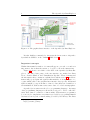
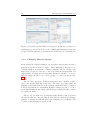
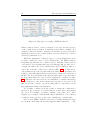
Figure 3.7: OpenGeoSys Data Explorer dialogs for modification of data sets:
(a) Mapping geometry based on a mesh or DEM, (b) Changing the material
groups of a mesh, (c) Remove elements from a mesh based on certain criteria.
3.3.8
Changing Material Groups
Each element in a mesh is assigned a non-negative integer that specifies a
material group this element belongs to. These material groups can be arbitrarily assigned. For instance, a mesh containing only two groups could
name these groups “17” and “98” or use some different, arbitrary IDs. By
right-clicking on a mesh and selecting Edit Material Groups... it is possible the change the ID of one or more groups or to merge groups (see fig.
3.7b).
The two basic options are “Condense material groups to smallest possible
range” and “Replace material group value”. The first option will rename all
material groups such that the group with the smallest ID will be assigned
0, the group with the second-smallest ID will be assigned 1, and so on. In a
mesh with 10 different material groups the largest existing ID will be 9 after
processing the mesh.
The second option allows to specifically rename the ID of any group from
the current value A to any new value B. If B already exists, the programme
will give a warning and ask the user if the renaming process should really
be started, thus merging groups A and B.