1
Getting started
Getting started
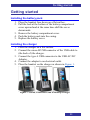
Installing the battery pack
1. Place the handset face down on a flat surface.
2. Pull the lock at the bottom of the battery compartment
cover upward and at the same time shift the cover
downwards.
3. Remove the battery compartment cover.
4. Push the battery pack into the casing.
5. Replace the battery cover.
Installing the charger
1. Place the charger on a flat surface.
2. Connect the micro-B USB connector of the USB cable to
(the back of) the charger.
3. Connect the type A USB connector to the USB AC/DC
Adapter.
4. Connect the adapter to an electrical outlet.
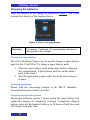
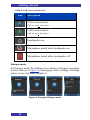
5. Place the handset on the charger as shown in Figure 1.
Figure 1: G566d, G566s and G266 in Desktop Charger
11