1
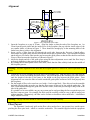
System Operation Figure 5: Starting position of fiber in the loader. Fiber should be placed in the loader in the position shown in Figure 5, with the end level with the inside edge of the left-hand shim. Wide Option Figure 6: Operation of the Wide Option Automatic Loader with thin fiber. A Wide Option is available for the Automatic Loader for use with thicker fiber (up to about 300 µm glass diameter). The shim plates are further apart to allow space for the thicker fiber to bend. It also uses thicker shim plates. Apart from the difference in dimensions, the operation is identical to the standard Loader. The Wide Option can be used for thinner fiber by restricting the width of the slot as shown in Figure 6. An extra piece of shim is included (shown green in Figure 6) which can be slipped into the slot. Once in position it can be held there by dropping two screws into the two holes in the shim plates and shim. The shim has two small holes (shown in red) which can be used to push and pull the shim into position or to remove it. Operation Under Windows Operation of the loader using 2POINT for Windows is similar to operation with the DOS version. However, details of operating the loader under Windows are in the 2POINT for Windows manual (either the printed copy or the online help file) for information. Operation Under DOS The 2POINT for DOS program is run after reading in a suitable profile file (either by placing the profile file name on the command line or reading the profile from the Read/Write Profile menu). To see the loader operate, a suitable profile is given in LOAD-TST.INI. This file contains: LOADER User's Manual 7 System Operation