1
PURPOSE OF THIS MANUAL
The Administrator User Manual is a guide for all persons who are responsible for adding and
maintaining their site’s users.
Use the <Tab> key to navigate between fields
within the screens.
SESSION TIMEOUTS
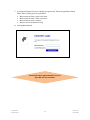
The system will automatically log off a user who has been inactive for at least 30 minutes. A Session
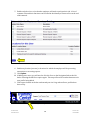
Timeout Warning appears two minutes before the user is set to be logged out to give them an
opportunity to remain logged in.
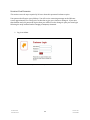
Figure 1 – Session Timeout Warning
If the user clicks OK on the warning screen within the two-minute grace period, the session
period will restart.
If the warning appears and no action is taken:
a) The warning closes automatically at the end of the two-minute grace period.
b) The session times out.
c) The user's browser session is automatically redirected to the Logout screen. This
indicates the session timed out due to inactivity.
User Administrator
HVFCU User Manual
1
Version No.: 002
Revised 200908