1
ADVANCED PLAYBACK OPERATION
This chapter explains playback of commercially available
BD and DVD discs, CDs, and recorded DVD-RW/R discs.
Note
– For the basic playback operation, see page 6.
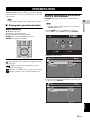
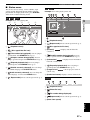
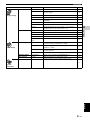
■ On Screen menu
To display On Screen menu, press ON SCREEN. After
that, press 5/a /2/3 to select an item, then press
ENTER to operate the desired function.
DVD
–
–
–
–
–
–
–
Normal
Shuffle CH (chapter)
Shuffle TT (title)
Shuffle All
Random CH (chapter)
Random TT (title)
Random All
VIDEO
–
–
–
–
–
MUSIC
PHOTO
Normal
Shuffle F (folder)
Shuffle All
Random F (folder)
Random All
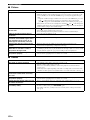
Audio BD DVD VIDEO : Shows audio language/
signal of BD/DVD disc currently selected. You can select
the desired type of audio.
Angle BD DVD : Shows the currently-selected angle
number. If the video is recorded with multiple angles, you
can change the angle.
On Screen menu contains following items.
Title BD DVD VIDEO : Shows the title number being
played back. You can skip to the desired title by selecting
it from this item.
Chapter BD DVD VIDEO : Shows the chapter
number being played back. You can skip to the desired
chapter by selecting it from this item.
Track/File CD VIDEO MUSIC PHOTO : Shows
track/file number being played back. You can skip to the
desired track/file by selecting it from this item.
Time BD DVD CD VIDEO MUSIC : Shows the
playback time. Select display type from the following:
– Elapsed playback time of the title, chapter, disc,
track or file
– Remaining playback time of the title, chapter, disc,
track or file
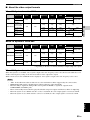
Mode/Play Mode
DVD CD VIDEO MUSIC PHOTO : Shows current
playback mode. You can select playback mode from the
following:
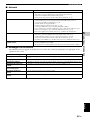
Subtitle BD DVD VIDEO : Shows the currentlyselected subtitle language when the subtitle is provided.
Subtitle Style BD : Shows the currently-selected
subtitle style. This function is available only for Video-file
external subtitle. You can select the desired text style of
subtitle.
Bitrate BD DVD CD VIDEO
bitrate of the audio/video signal.
MUSIC : Shows
Second Video BD : Turns the PIP on/off (p. 6).
Second Audio BD : Turns the secondary audio on/off
(p. 6).
Ins Search
BD
DVD
CD
VIDEO
MUSIC : Skips 30 seconds.
CD
VIDEO
MUSIC : Replays the content
Ins Replay
BD
DVD
from 10 seconds before.
Slide Show PHOTO :
Shows slide show speed. You can select the slide show
speed from Slow/Medium/Fast.
CD
– Normal: Normal playback.
– Shuffle: Random playback without repetition.
– Random: Random playback with repetition.
Transition PHOTO : Shows how photo appears on the
screen. You can select the transition type.
Code Page VIDEO : Selects character code of subtitle
you added to DivX video (p. 44).
26 En