1
Chapter 8 Maintenance
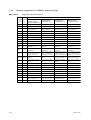
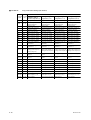
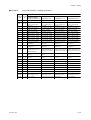
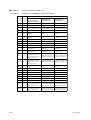
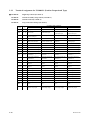
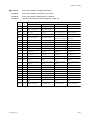
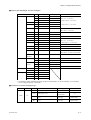
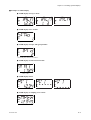
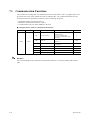
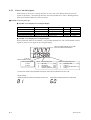
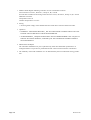
■ Possible errors during operation
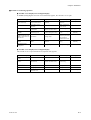
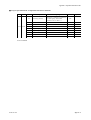
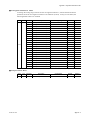
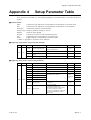
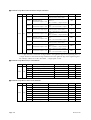
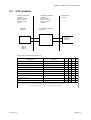
● Possible errors displayed on PV digital display
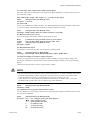
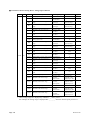
If ADERR (analog/digital converter circuit abnormal) appears, the cascade is set to open.
Error code display
Error content
Manipulated variable (MV)
Remedy
Error display clear
‘RJC’ and PV values
appear alternately
Reference junction
compensation failure
Continues
Contact us
—
OVER or -OVER
PV overflow or PV
underflow
Continues
Check control target
device /circuit
—
ADERR
Analog/digital conversion Preset MV for AUTO mode, Check wiring
continues for MAN mode
circuit failure
ATERR
Auto-tuning error
Continues with same PID value Check control target
as before starting auto-tuning
device
—
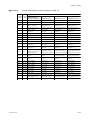
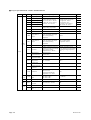
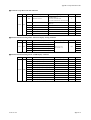
DISP key
Nothing output
Contact us if this
problem repeats itself
after turning the
controller off and on.
—
Communication circuit
failure
Continues
Check communication
wiring
DISP key
Dead wire condition
Nothing output
Check power supply
—
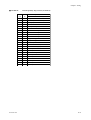
Remedy
Error display clear
Rightmost decimal point
flashes, all the others are
switched off
CPU failure
Leftmost decimal point
flashes
All indicators have
disappeared
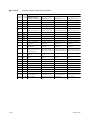
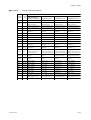
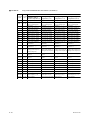
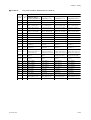
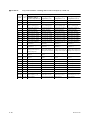
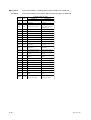
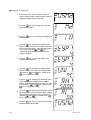
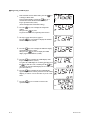
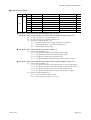
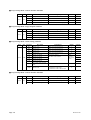
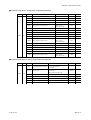
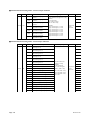
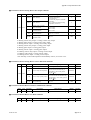
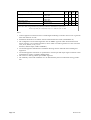
● Possible errors displayed on SV digital display
The cascade is set to open when B.OUT (input burnout) appears.
Error code display
IM 5D1A01-01E
Error content
Manipulated variable (MV)
“E.” on leftmost LED
flashes
EEPROM failure
Continues
B. OUT
Input burnout
Preset MV for AUTO mode,
continues for MAN mode.
Check wiring
—
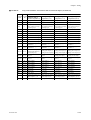
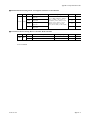
—————
Analog input overflow
Continues
Check process
—
—————
Analog input underflow
Continues
Check process
—
ERR
Automatic valve
calibration error
Continues
Check process
DISP key
Contact us
—
8-5