1
About Your Projector
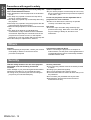
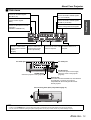
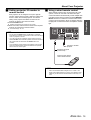
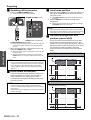
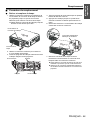
J Side views
S-VIDEO IN
Connect an S-VIDEO signals.
(Mini DIN 4 pin)
VIDEO IN
Connect a video signals.
(BNC)
RGB 2 IN
Connect an RGB or YPBPR signals.
(D-SUB 15 pin female)
LAN
Connect a LAN cable for network
connection.
(10BASE-T/100BASE-TX)
REMOTE 1 IN/OUT
Connect a cable from the
remote control or another
projector.
(M3 jack)
DVI-D IN
Connect a single link DVI-D signals.
REMOTE 2
Connect a cable from an
external control circuit.
(D-sub 9 pin female)
Air intake port
Preparation
RGB 1 IN
Connect an RGB or YPBPR signals.
(3, 4 or 5 wire BNC)
SERIAL IN/SERIAL OUT SDI IN (PT-DZ6710U only)
Connect an RS-232C cable Connect a cable from a
from/to a computer.
computer.
Air intake port
POWER button
Switch the projector on/off. (page 20)
AC IN terminal
Connect the power cord to supply
electronic power to the projector.
(page 20)
Security lock
Attach the commercial shackle lock, manufactured
by Kensington, to protect your projector.
Compatible with the Kensington MicroSaver
Security System.
Auto Cleaning Filter (ACF) compartment (page 31)
NOTE:
• Switch on the POWER button of the projector body that is located near the terminals before using the control buttons.
• Do not cover the ventilation openings or place anything within 50 cm (20") of them as this may cause damage or injury.
ENGLISH - 13