1
Using the Meter On-site
Security
The EM1200 series meter can store three (3) different passwords. During communication the
transmitted password is encrypted using a 16 bit algorithm. The three levels of passwords are
called the Main Password (MainPwd), Restricted Password 1 (RestPwd1) and Restricted
Password 2 (RestPwd2). The Main Password allows full access rights which cannot be altered.
The access settings for the restricted passwords are completely programmable and independent of
each other. There is no hierarchical relationship in the restricted passwords.
Programming the meter requires the use of the meter’s Main Password which allows unrestricted
access to all of the meter’s programmable features. It follows, therefore, that the programmer’s
version of EMPWin must have a User password that matches the meter’s Main Password to do any
meter programming. The restricted passwords will allow lower levels of access to the meter, e.g.
for reading billing or load profile information and setting/correcting the meter’s time.
Associated with the passwords is a lockout facility. This is activated after three (3) consecutive
incorrect attempts to access the meter and prevents any access for a period of one hour whist on
supply.
There are additional software access passwords for added security which are setup by the Meter
System Supervisor. This is explained in detail in the EMPWin User Manual and in the sections
below.
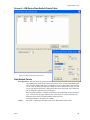
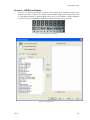
The setup of the Password system is done using the EMPWin Security program called EMSecure
which has its own entry password (called Administration Password). The Administration Password
and the Security program EMSecure should only be given to the Meter System Supervisor. This
program produces a master security database (default name is emsecure.mdb) for the complete
meter system which is provided to all Users. Incorporated in the database are all meter password
Groups and all system Users with their allocated password(s). Access to a particular meter can only
be obtained if the User has an allocated password which is one of the 3 passwords used by that
meter. The User need not know the actual password he is using, only the name of the Meter Group
he has authorised access to.
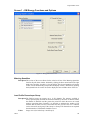
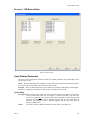
The following parameters are required for the EMSecure program only:
Group Name
Description The name of the Meter Group allocated by the Meter System Supervisor. As
explained above each group has 3 meter passwords which can be programmed into
Groups of meters. If the meter system uses only one set of meter passwords then only
one group name need be created.
Values
Up to 30 alphanumeric characters (case sensitive)
Main password (MainPwd)
Description This is the highest level access password for the specified meter group. Authorised
main password users have full read/write access rights to carry out all types of meter
reading, control, configuration and program modifications for the specified meter
group.
Values
Integer number must be 8 digits.
Restricted password 1 (RestPwd1)
Restricted password 2 (RestPwd2)
Description A separate list of Meter Programming Access and Toolbox Function Access rights for
each of the restricted password levels can be programmed by the Meter System
Supervisor (Administration Password holder) only, see Security program below.
Values
Integer number must be 8 digits.
Feb-04
43