1
BASIC OPERATION
PREPARATIVE
1)
Before the unit is turned ON, please check if all the connections are right and safe. Then connect the main
power.
2)
Press the POWER ON/OFF button on the back panel to turn on the main power.
STATE INDICATION OF DISPLAY SCREEN
1.
In radio mode, the display screen will show the currently tuned frequency and the mono/stereo status.
2.
In audio input, iPod/iPhone status, show the signal input and main volume status.
STANDBY MODE
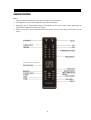
Press the STANDBY button on the remote control (or on front panel) to switch to active or standby mode.
Note: Make sure that the unit is connected to the power source.
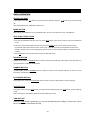
TONE FUNCTION
In the play back status, press the TONE button on the remote control to select the Subwoofer, Bass or Treble
adjusting mode; then press the VOL +/- button to adjust the effect of Subwoofer, Bass or Treble.
DIRECTION BUTTONS
While playing the iPod/iPhone, press the Direction buttons ▲ ▼ ◄ ► to move the cursor to
select the item you want.
MUTE BUTTON
If you press the MUTE button during play back, sound output will be switched off. Press the MUTE button again
or the VOL+/- button to resume the previous volume level.
VOLUME SETTING
Press the VOL.+/- button to increase or decrease the volume.
FAST FORWARD & FAST REWIND
In USB/SD mode, press the
or
button to fast rewind or fast forward. Press the button again to resume
playing mode.
In iPod/iPhone mode, long press the
or
or
button to fast rewind or fast forward, Release the button of
to resume playing mode
Note: These buttons are unavailable in audio input mode.
-9-