1
English
Supplied accessories
–
AC power cord
–
Remote control
–
AUX-in cable
–
•
Docking kit
1 x Apple iPod dock (pre-installed with the
main set)
dock adaptors (8 adaptors for different iPod
types)
1 dust cover (keep the dock connector from
covering dust and dirt)
•
•
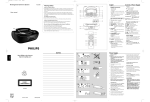
Top and front panels (See 1)
Controls / Power Supply
For Tuner:
– tunes to a radio station
9 – stops disc playback;
– erases a program
DBB – turns on/off bass enhancement
@ p – 3.5 mm stereo headphone socket
Helpful hints: The speakers will be muted
when headphones are connected to the set.
# AUX jack – connects an external source
(3.5 mm socket)
$ Battery door – opens to insert 6 x 1.5V
R-20/ -UM1/ D-cells
% Disc tray – load a disc
^ iR – infrared sensor for remote control
1 Telescopic antenna – improves FM
reception
2 DOCK – selects dock source
3 Dock connector – connects iPod player
4 VOLUME/VOL +/- – adjusts volume level
5 MODE – selects different play modes:
e.g. REPEAT or SHUFFLE (random order)
6 PROGRAM
For disc – programs tracks and reviews the
program
For Tuner – auto searches and stores radio
stations
7 ALBUM/PRESET +/- ( 3, 4 )
For MP3-CD/ WMA play:
– select albums
For Tuner
– selects a preset radio station
Remote control (See 1)
&
*
(
)
¡
™
£
≤
∞
Power Supply
Whenever convenient, use the power supply
cord if you want to conserve battery life.
Make sure you remove the plug from the set
and wall outlet before inserting batteries.
8 / – opens/closes the disc tray
9 SOURCE: – selects CD/MP3-CD, DOCK
mode,Tuner or AUX
0 POWER – powers on/off the system
! 2; – starts or pauses disc/DOCK playback
∞§
For disc/ DOCK play:
– skips to the beginning of a current/
previous/ later track
– fast searches backwards and forwards
within a track
Downloaded From Disc-Player.com Philips Manuals
CD – selects disc mode
TUNER – selects tuner mode
DOCK – selects dock (iPod) source
AUX– selects AUX mode
9 – stops disc playback;
– erases a program
REPEAT – repeats a track/disc/all
programmed tracks
SHUFFLE – turns on/off the random play
mode
DBB – turns on/off bass enhancement
MUTE –mutes or restores the volume
•
Batteries
Main set (See 1)
Insert 6 batteries, type R-20, UM1 or Dcells (not included, preferably alkaline) with
the correct polarity.