1
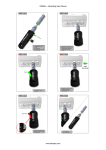
Figure 13: Recording/Playback control panel
Selector Switch Playback Mode
The playback start operation is very easy: just rotate the
selector switch to the desired the show number position and
press it. Remember that during playback no need to worry
about data direction as data is sent on both the DMX and
ArtNet ports as outputs: Pressing the selector switch again
ends playback.
During playback, if the show file is present on the microSD
card, the multifunction LED will light GREEN. Otherwise if the
show file associated to the selector position is empty, the
multifunction LED will light RED for few second before
returning to s standby state.
Figure 16: Show playback start
Figure 14: Show selection
Figure 15: Show playback stop