Transcript
Wireless Motion Sensor LED Spotlight with Remote
Motion Sensor Removal Instructions
MB371
Important: These instructions can only be used with Mr. Beams products that come with a remote.
Before you begin, these instructions are for customers who only wish to activate their light via remote control. By removing the motion sensor, your light will no longer activate with motion. The auto-shut off timer will still turn the light off after
selected time. These instructions are not for those who are looking for a light to stay on for long periods of time. Please
note that once the sensor is removed, your warranty is void. We appreciate your interest in our products and
are more than happy to help you customize your light for your specific need. Please call or email any questions to
our customer service. Phone: 1 (877) 298-9082
Email: info@mrbeams.com
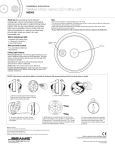
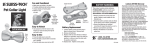
1. Remove front cover of Spotlight by rotating
counter-clockwise as shown above. Pull face
out from cup to reveal battery compartment.
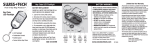
2. Remove the six screws on the
inside of the face of the Spotlight.
Motion Sensor
Light Sensor
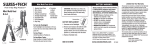
3. Pull the face apart from the battery compartment. Locate the motion sensor (a circle with a
black rectangle inside). The motion sensor can
be removed with needle nose pliers, gently twisting until it detaches from unit.
www.mrbeams.com
4. Remove light sensor with needle nose pliers, gently
twisting until it detaches. Replace battery compartment
into face of the light. Screw six screws securely and
twist back to base of light. See your user manual for
installation instructions.
32333 Aurora Rd. Suite 100 Solon, OH 44139
877.298.9082