1
Using the Waterproof Housing
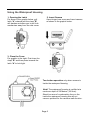
1. Opening the Latch
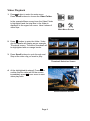
Per arrow in the graphic below, pull
latch "A" outward and the clasp "B"
will slacken and allow you to pull lock
mechanism away from the rear cover.
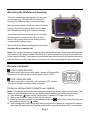
2. Insert Camera
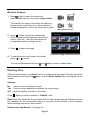
Open hinged rear cover and insert camera
as shown in the graphic below.
3. Close the Cover
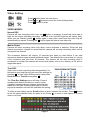
Per graphic to the right, First close the
clasp "B" and then press inwards the
latch "A" to lock tight.
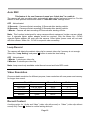
Two button operation only when camera is
Inside the waterproof housing.
Note! The waterproof housing is certified at a
maximum depth of 30 Meters (100 feet).
Should an area of condensation form on the
inside the waterproof housing this will not
cause a problem for the cameras safe function.
Page 5