1
DataWedge Configuration | 95
•
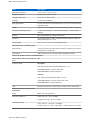
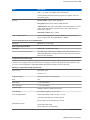
- Security All Thrice - Three times read redundancy for all bar codes.
Picklist - Allows the imager to decode only the bar code that is directly under the cross-hair/reticle (+) part of the
pattern. This feature is useful in applications where multiple bar codes may appear in the field of view during a
decode session and only one of them is targeted for decode.
-
•
•
Disable – Disables Picklist mode. Any bar code within the field of view can be decoded (default).
Enabled – Enables Picklist mode. Only the bar code in the center of the image is decoded.
Hardware Picklist – Enables Picklist mode so that only the bar code under the projected reticle can be
decoded.
- Software Picklist - Enables Picklist mode so that only the bar code in the center of the image is decoded.
Aiming Pattern - Turns imager aiming pattern on or off during data capture. On (default) or Off.
Aim Type
-
•
•
•
•
•
•
•
•
•
Trigger - The device decodes a bar code on each Scan button press. (default).
Continuous Read - The device continuously decodes bar codes as long as the Scan button is held down and
the previous bar code decoding is complete. This mode is useful when the user wants to perform rapid
scanning.
Same Symbol Timeout - Use to prevent the device from decoding the same bar code within a specific time
interval (applicable only when Aim Type is set to Continuous Read). The user can perform rapid scanning and
prevents the user from decoding the same bar code twice. Set this value to an appropriate interval (in
milliseconds). A value of 0 indicates no interval is required between two successive reads (default - 500).
Different Symbol Timeout - Use to prevent the device from decoding another bar code within a specific interval
(applicable only when aim type is set to Continuous Read). The user may want to prevent decoding too quickly
and set an interval that the user can aim before scanning the next bar code. A value of 0 indicates no interval is
required between two successive reads (default - 500).
Illumination mode - Turns camera illumination on and off. This option is only available when camera is selected
in the Barcode input Scanner selection option.
- On - Illumination is on.
- Off - Illumination is off (default).
Hardware Engine Low Power Timeout - (Imager only)
Inverse 1D Mode - This parameter allows the user to select decoding on inverse 1D bar codes.
- Disable - Disables decoding of inverse 1D bar codes (default).
- Enable - Enables decoding of only inverse 1D bar codes.
- Auto - Allows decoding of both twice positive and inverse 1D bar codes.
1D Quiet Zone Level - Sets the effort the decoder performs to decode margin-less bar codes. Applies to any
symbology with margin-less bar code decode enabled parameter. Since higher margin-less levels will increase the
mis-decode risk and decoding time, we strongly recommend the user only enable the symbologies which needs to
choose higher margin-less level, and leave all other symbologies at low default level 1.
Poor Quality Decode Effort - Enable poor quality bar code decoding enhancement feature.
Viewfinder Mode - Configures the Viewfinder modes supported for camera scanning.
-
Viewfinder Enabled - Enables only the viewfinder.
Static Reticle - Enables the viewfinder and a red reticle in the center of the screen which helps selecting the
bar code (default).
Scan Params
Allows the configuration of Code ID and decode feedback options.
•
Code ID Type - A Code ID character identifies the code type of a scanned bar code. This is useful when the
reader is decoding more than one code type. Select a code ID character to insert between the prefix and the
decoded symbol.
-
Code ID Type None - No prefix (default).
MN001975A01-A | July 2015