1
MEYER SOUND MAPP ONLINE™
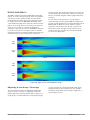
MAPP (Multipurpose Acoustical Prediction Program)
Online is a powerful, cross-platform, Java-based
application for accurately predicting the coverage
pattern, frequency response, impulse response, and
maximum SPL output of arrayed Meyer Sound
loudspeakers. Residing on the local host computer, the
Java application facilitates configuring arrays of a wide
variety of Meyer Sound products and, optionally, defines
the environment in which they will operate, including air
temperature, pressure, and humidity, as well as the
location and composition of walls. You can find MAPP
Online at:
www.meyersound.com/products/software/mapponline
NOTE: You will need to apply for use of MAPP
Online by clicking on the appropriate link on
the screen at the URL above. Once your
registration is complete, you will be given a
user name and password, which will be
returned to you by email along with the
address for the MAPP Online program itself.
Follow the online instructions to install the
program on your computer.
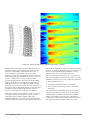
When a prediction is requested, data are sent over the
Internet to a high-powered server computer at Meyer
Sound that runs a sophisticated acoustical prediction
algorithm using high-resolution, complex (magnitude
and phase) polar data. Predicted responses are returned
over the Internet and displayed on the local host in color.
With MAPP Online, you can:
■
Plan an entire portable or fixed loudspeaker system
and determine delay settings for fill loudspeakers
■
Clearly see interactions among loudspeakers and
minimize destructive interference
■
Place microphones anywhere in the sound field and
predict the frequency response, impulse response,
and sound pressure at the microphone position
■
Refine your system design to provide the best
coverage of the intended audience area
■
Use a virtual VX-1 Program Equalizer to predetermine
the correct control settings for best system response
■
Gain valuable load information about the array to
determine rigging capacities
MAPP Online enables sound system designers to come to
an installation prepared with a wealth of information
that ensures the system will satisfy their requirements
“out of the box” – including basic system delay and
18 • M3D™ Line Array
equalization settings. Its accurate, high-resolution
predictions eliminate unexpected onsite adjustments and
coverage problems. With MAPP Online, every sound
system installation has the maximum chance of success.
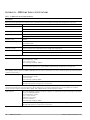
MAPP Online is compatible with Windows, Linux, Unix,
and Apple Macintosh computers running Mac OS X
version 10.1.2 or higher. MAPP Online requires Java Web
Start version 1.0.1_02 (included with Mac OS X).
RMS™ (REMOTE MONITORING SYSTEM)
Once an installation is complete, use Meyer Sound’s RMS
system to monitor system performance.
RMS is a real-time monitoring system that connects the
Meyer Sound self-powered speakers with an
IBM-compatible computer at the sound mix position or
other location. RMS software delivers extensive status
and system performance data directly to the operator
from every installed speaker.
RMS displays include amplifier voltages, limiting activity,
power output, temperature, fan and driver status,
warning alerts, and other key data for up to sixty-two
speakers, without a network repeater, at a display
update rate of two to five times per second. More
information is available, and with greater convenience
than from conventional monitor systems. The RMS
Monitor Program interface can be learned quickly, and
runs in a Microsoft Windows 95 or Windows 98, 2nd
Edition environment.
Monitor Displays
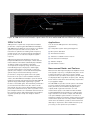
Each speaker appears on the computer’s color monitor as
a “view” in the form of a status icon, bar graph meter, or
text meter (numerical values), depending on user
preference.
Each view contains speaker identification information
and data from the amplifier, controller, driver, and
power supply of that particular unit. System status
conditions cause changes in Icon and bar graph
indicators, alerting the operator to faults or excessive
levels. The views are moveable and typically are
arranged on the screen to reflect the physical layout of
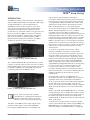
the loudspeakers. A user can design a screen “panel” of
icons or meters, as shown in Figure 29, and save it on the
computer’s hard disk, conveniently named for a unique
arrangement or performer. If the speaker installation
pattern changes completely, a new screen panel can be
built. If a different subset of already installed speakers is
to be used at the next show, only selected speakers need
appear on the monitoring screen for that performance.
Meyer Sound Laboratories Inc