1
Communicating with Contacts
Tell-Me-When
5.3.2 List of all Tell-Me-When Entries
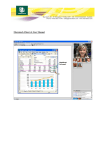
The List of all Tell-Me-When entries provides an overview of all active Tell-MeWhen features. You can access this dialog via the Contacts function window by
clicking on
More features > Show all Tell-Me-When ... in the toolbar.
NOTICE: You can also access the List of all Tell-Me-When
entries dialog via the Pearl menu > Personal Settings > TellMe-When.
A list entry contains the following elements (from left to right):
•
A Tell-Me-When presence icon
•
Contact Name
If you place the mousepointer on the contact's name in the list of Tell-MeWhen entries, the Tell-Me-When settings for this list entry are displayed as
tooltip.
•
Notification type or action to be performed when the voice or presence availability changes
Possible are the following notification options and actions:
–
Notification pop-up
–
E-mail
–
Callback
For each list entry, the following features are available:
•
Lookup Person
A click on this icon opens the Lookup Person window, which contains information related to the selected contact.
•
Show/modify Tell-Me-When entry
A click on this icon opens the Tell-Me-When dialog, which lists the current
settings of the selected active Tell-Me-When feature. You can also edit the
settings there.
•
Delete Tell-Me-When entry
A click on this icon removes the associated Tell-Me-When entry from the list.
Thus, the Tell-Me-When feature for this contact is also deactivated.
Furthermore, this dialog provides the following two buttons:
•
234
Delete All
A click on this button removes all Tell-Me-When entries from the list.
A31003-S5070-U103-8-7619, 01/2014
OpenScape UC Application V7 ODC Enterprise Web Embedded Edition, User Guide