1
English
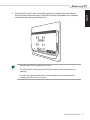
5. Mount the All-in-one PC onto a firm wall by applying a standard wall mount kit (pad
and rack) to the wall mount screws. Follow the instructions described in the installation
manual that came with your wall mount kit.
• The wall mount screws are optional accessories.
• The wall mount kit should comply with VESA 100 standards, which can be purchased
separately.
• To ensure safety, please read the wall mount kit installation manual carefully before
mounting your All-in-one PC to the wall.
All-in-one PC ET2012 Series
31