1
•
Remote Control Mode
The DPA880 is mainly thought to operate with Remote Control Sw running on Pc.
Nevertheless, once created the desired presets for the defined applications, the unit can operate
as a Stand Alone one, as seen before or as Wall Panel Remote Control working device.
The Remote control, when operated by the Wall Panel Remote control, is working on the base of
the RS485 connector of the DPA880
The Pc Sw remote control, can instead operate with USB or RS485 connection.
When used the USB connection, the Pc Sw Remote Control can control/edit ONLY one unit per
time.
When used the RS485 connection, the Pc Sw Remote Control can control/edit MORE units at the
same time, connected each others in net.
A particular way of “double” Remote Control is allowed, being possible to connect to the RS485
the Wall Panel Control and at the same time the Pc Sw Remote Control can be used if connecting
the Pc on the USB connection.
Wall Panel Remote Control Operations
The DPA880 can be controlled by a Remote Wall Panel, allowing to load one of the first 4 available
presets stored within the unit, or to increase/decrease the Main output Volume of the unit itself.
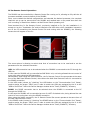
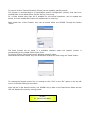
The Wall Panel Remote Control is looking as follow
The buttons “Preset 1” to “Preset 4” are used to load one of the first 4 presets stored within the
DPA880
Once selected the desired preset, the related led will turn ON.
The buttons “Up/Down” can be used to increase/decrease the DPA880 Output Level.
A “Lock” key is available in order to “lock/unlock” the Preset and Up/Down buttons, so to inhibit
their use.
When the buttons are locked, the “unlocked” led will be Off.
The Wall Panel Remote Control has to be connected to the RS485 connector of the DPA880