1
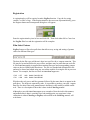
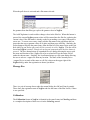
When the pull-down is activated and a film name selected:
the gammas from that film type replace the gamma values in NegPos.
The Add/Chg button is used to add or change values in the film list. When this button is
pressed, the current NegPos gamma values will be entered into the film list, replacing the
current values if the film name is already on the list or making a new entry if the name is
a new one. To create a new entry, simply edit the film name in the pull-down edit box,
insure that the correct gamma values are in place and then press Add/Chg. Similarly, the
Delete button will delete the named entry from the film list (if the name exists on the list).
Both Add/Chg and Delete affect only the list currently in use by NegPos. This list will be
lost when NegPos is exited. Changes do not become permanent until the Save button is
pressed. The Save button brings up a standard file save dialog allowing the user to pick
the name and location of the *.negpos file to be saved and will save the entire file list
under the chosen name. Similarly, the Load button brings up a file open dialog allowing
the user to select a *.negpos file from any location. The name of the currently active
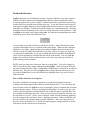
*.negpos file (or as much of the name as will fit) is shown at the upper right of the
NegPos dialog, under the registration as shown just below:
Message Box
There is a pair of message boxes under the normal dialog box OK and Cancel controls.
These show the registration state of NegPos and also the name of the film list file, if there
is one specified.
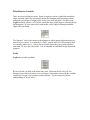
Calibration
The Calibration feature in NegPos is identical to the same feature in ColorNeg and there
is a complete description of how to use it in the ColorNeg manual.