1
Assembly of the air fan:
If you use brushless motors with
less than 4.5T or if the ambient
temperature is high, we recommend the use of the included air
fan. The fan is assembled with 4
screws on the cooling surface of
the speed controller. To ensure
the 6 V power supply the cable of
the fan is plugged in a free plug-in
place of the receiver.
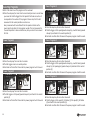
j) Press the setup key for more than 3 seconds until you hear a sound.
k) Push the throttle trigger to full throttle - you hear a sound again.
l) Now you push the throttle trigger to full brake until you hear a sound
again.
m) The throttle trigger is now moved back to the neutral position and the
basic setup is finished.
n) Both LEDs of the speed controller go out and three sounds confirm the
correct setup. Please note, this takes appr. 10 seconds. Please wait for
the sounds for the confirmation.
5. Basic Setting Controller/Transmitter-Setup
Requirements for the basic settings are the following conditions:
a) The power cable „A“, „B“ und „C“ of the speed controller must be connected to the motor!
b) The controller BEC-cable is connected to the receiver in plug-in place 2!
c) The sensor cable is not connected to the Sensor/USB-jack. The jack
must be open!
d) Now switch on the transmitter and you can begin with the basic set up!
e) The direction of rotation of the throttle-function of the transmitter
must be set to “NOR“ (normal)!
f) Special setting for Futaba transmitters: The direction of rotation must
be set to “REV“ (reverse)!
g) The end point adjustment of the throttle (EPA) must be set to 100
% and the end point of the brake must be set to 150 % (if possible,
otherwise 100 % too). With
very cheap transmitters this
setting is not be possible, use
the standard settings.
h) Now connect the battery to
the speed controller, take care
of the polarity!
i) The switch of the CS-Rocketcontrollers is now set to ON!
4
full throttle
full brake
neutral
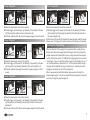
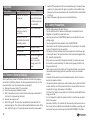
Check of the basic setup “Speed-Controller-Transmitter-Adjustment”:
a) in neutral position of the throttle trigger, both LEDs shine red and
yellow,
b) at slow acceleration, the red LED goes out,
c) at full throttle, the yellow LED goes out and the red LED shines,
d) at slow braking, both LEDs go out,
e) at full brake, the red LED shines.
The speed controller is now calibrated to your transmitter.
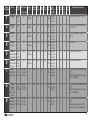
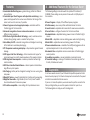
6. Power Programs, Overview and Setting
The CS-Rocket Competition Brushless comes with 9 power programs,
which can be selected for different types of RC-Cars and different handling
characteristics. The setting is done with the setup key and the throttle
trigger of the transmitter. By moving the throttle trigger to full throttle or
full brake the program numbers will be increased and finally saved in the
speed controller.
Hint: Move the throttle trigger slowly and always to the end point.
The table on the next page shows the recommended use of the different
programs.