1
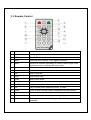
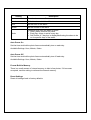
3.3 Remote Control
Key
Function
1
Power
Turn the photo frame on or off
2
BMG
Start a slideshow with background music
3
Mute
Mutes the sound output. Press again to unmute.
4
Menu
Behavior is different depending on context, either brings up an
operations menu or displays the main menu.
5
Up
Move cursor up
6
Return
Go back to the previous step
7
Left
Move cursor left
8
Right
Move cursor right
9
Down
Move cursor down
10
Setup
Go to the setup menu
11
Play/Pause
Play or pause photo slideshow, music, or video
12
OK
Play or pause photo slideshow, music, or video
13
Zoom
Zoom in when viewing a photo (slideshow must be paused)
14
Volume-
Decrease the volume for music or video playback
15
Volume+
Increase the volume for music or video playback
16
Rotate
Rotate a photo clockwise 90 degrees. Press Play to resume
slideshow.