1
4.Junior User Guidebook
Introduction to the Structure of the Oscilloscope
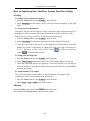
When you get a new-type oscilloscope, you should get acquainted with its front panel at
first and the TDS series digital storage oscilloscope is no exception. This chapter makes a
simple description of the operation and function of the front panel of the TDS series
oscilloscope, enabling you to be familiar with the use of the TDS series oscilloscope in the
shortest time.
Front Panel
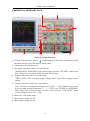
The TDS series oscilloscope offers a simple front panel with distinct functions to users for
their completing some basic operations, in which the knobs and function pushbuttons are
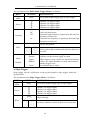
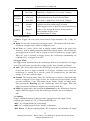
included. The knobs have the functions similar to other oscilloscopes. The 5 buttons (F1 ~
F5) in the column on the right side of the display screen or in the row under the display
screen (H1 ~ H5) are menu selection buttons, through which, you can set the different
options for the current menu. The other pushbuttons are function buttons, through which,
you can enter different function menus or obtain a specific function application directly.
1
7
2
6
5
4
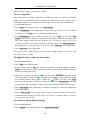
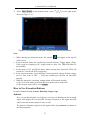
Figure 4-1 Front panel
1.
2.
3.
4.
5.
6.
7.
Display area
Control (key and knob) area
Probe Compensation: Measurement signal (5V/1KHz) output.
Signal Input of 4 Channels
Menu off
Power on/off
Folding Foot stool in the bottom (which tilt the oscilloscope )
6
7 3