1
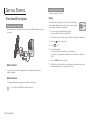
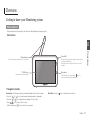
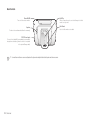
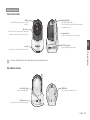
Overview Getting to know your Monitoring system Wireless Monitor After opening the box, fully charge the monitor before use. After initial charge, recharge as needed. Front Controls 04 When the monitor is being recharged or monitor has low electricity, red light flashes. When the monitor is working, the LED becomes solid red light. 5” LCD Screen Microphone Displays video from the camera. Navigation Controls Viewing Mode: The following controls are used while watching live video from the camera: • Press the [ ] or [ ] icon to adjust camera’s framing upwards or downwards. • Press the [ ] or [ ] icon to adjust camera’s framing to the left or right. • Press [ ] icon to zoom in/out the screen. While in zooming, use [ ] icon to move the screen around. Overview Power LED Monitor Antenna Receives and sends signals from or to the camera. Transmits audio to the camera when [ ] icon is pressed down and held like a walkie talkie. Menu Mode: Press the [ ] icon to confirm the menu selection. English · 11