1
Product View
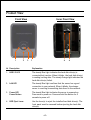
Front View
1
2
Inner Front View
3
1
4
4
Nr Description
Explanation
1. HDD1/2 LED
The steady Blue light indicates the hard disk drive(s) is
connected but inactive. When it blinks, the hard disk drive(s)
is reading/writing data. The steady Orange light indicates the
hard disk drive(s) failed.
2. LAN LED
The steady Blue light confirms that the server has a good
connection to your network. When it blinks, the storage
server is receiving/transmitting data from/to the network.
3. Power LED
Power Button
The steady Blue light indicates the server is powered on.
Press once to power on. Press and hold the button for 5
seconds to power off.
4. HDD Eject Lever
Use the lever(s) to eject the installed hard disk drive(s). The
front panel must be removed before ejecting the hard disk
drive(s).
-6-