1
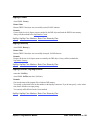
GetContext
Gets the application context associated with the application callback method
GetWidth
Gets the width (in pixels) of the displayed buffer area
GetHeight
Gets the height (in lines) of the displayed buffer area
GetViewArea
Gets the width and height of the viewing area
GetScrollPos
Gets the current scrolling position of the viewing area relative to buffer coordinates
GetScrollRange
Gets the scrolling range of the viewing area relative to buffer coordinates
GetIndex
Gets the index of the last displayed buffer
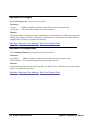
IsAutoEmpty
SetAutoEmpty
Gets/sets the ‘auto-empty’ mechanism
GetOverlayMode
SetOverlayMode
Gets/sets the viewing mode when dealing with buffers of overlay type
GetKeyColor
SetKeyColor
Gets/sets the keying color when dealing with buffers of overlay type
GetScalingMode
SetScalingMode
Gets/sets the mode specifying how buffer content is scaled to the viewing area
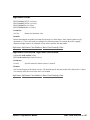
GetImmediateMode
SetImmediateMode
Gets/sets the view thread bypass mode
GetWindowTitle
SetWindowTitle
Gets/sets the title of view windows automatically created by SapView
HasRange
Checks if the view resource can show a subrange of buffer data bits
GetRangeMinMax
Gets the minimum and maximum viewing range values
GetRange
SetRange
Gets/sets the viewing range value
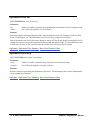
GetThreadPriority
SetThreadPriority
Gets/sets the execution priority of the viewing thread
GetHandle
Gets the low-level Sapera handle of the view resource
Operations
Init
Initializes the view index
Show
Shows the next buffer or a specific one, possibly skipping buffers in the process
ShowNext
Shows the next buffer, without skipping any buffers in the process
Hide
Hides the currently displayed buffer
GetDC
Gets the Windows Device Context corresponding to the view window
ReleaseDC
Releases the Windows Device Context corresponding to the view window
GetLut
Gets the current view lookup table
Sapera++ Programmer's Manual
Basic Class Reference • 317