1
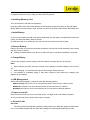
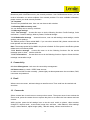
4. Fit the battery with the metallic contacts at the right bottom comer.
5. Replace the back cover by fitting it to the back of the phone.
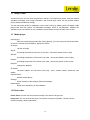
2. Installing Memory Card
Turn off the phone, and take out the battery.
Keep the golden color side of the Memory card downward, and push it gently to the right place.
Before take out off the memory card, be sure to Power off the phone and remove the battery first.
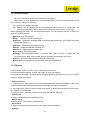
3. Install Battery
(1)Connect the battery’s metal touch points separately with the battery compartment metal touch
points, and enter the battery base to the slot.
(2) Slide the back cover toward the top of the phone to lock the cover into its place.
4. Remove Battery
Remove the back cover then push toward the bottom of the phone and lift the battery at the at the
top side center to remove.
z Settings and data stored in the phone or SIM card may be lost after the battery is removed.
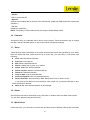
5. Charge Battery
Connect the charger to power supply, and then insert the charger pin into the I/O jack.
Note:
1. When charging, DO NOT removes or takes out the battery to avoid the battery circuit to burn
out.
2. While charging, it is normal that the phone and charger will become hot.
3. If the battery is completely empty, it may take a period of time before the charging icon
appears on the display.
6. USB Management
When USB cable plugged in, phone will have the following options:
z Mass storage: the phone can be connected to the PC and used as a USB Flash Disk.
z Webcam: the phone can be connected to the PC and used as a PC camera.
z COM port: the phone can be connected to the PC and used as Dial-Up Network.
7. Power on and off
Press and hold Power key to turn on/off the phone , set flight mode ,and restart the phone.
And if you have set PIN or phone code, input it correctly.
8. Security Cods
PIN Code
The PIN (Personal Identification Number) code protects your SIM card against unauthorized
use. It is normally supplied with the SIM card package. Be careful while entering PIN code,
9