1
3.6
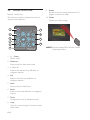
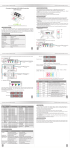
Remote control view
9. Rotate
Rotate the current image clockwise by 90
degree in slide show mode
Remote control keys
This section provides a detailed overview of
remote control features.
1
10. Delete
Delete the current image
7
2
8
Slideshow
3
Zoom
Copy
9
OK
4
Rolate
10
5
Menu
Mode
Delete
6
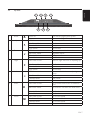
1. ◎ Power
Power on/off
2. Slideshow
Shortcut key for slide show mode
3. < / >, V / Λ
Refer to the direction key definition on
navigation buttons
4. OK
Refer to the Enter key definition on
navigation buttons
5. Menu
Shortcut key for Main Menu
6. Mode
Refer to the Mode definition on navigation
buttons
7. Zoom
Change zoom ratio in slideshow mode
8. Copy
Copy the current image to Favorite in slide
show mode
EN-8
NOTE: Recommended DPF Remote Control
Operating Position