1
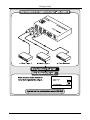
Connecting the VS-201YC 2x1 s-Video Switcher
5
Connecting the VS-201YC 2x1 s-Video Switcher
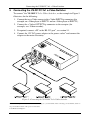
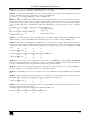
To connect1 the VS-201YC 2x1 s-Video Switcher, as the example in Figure 5
illustrates, do the following:
1. Connect the two s-Video sources to the s-Video INPUT 4p connectors (for
example, an s-Video player to INPUT 1 and an s-Video player to INPUT 2).
2. Connect the s-Video OUTPUT 4p connector to the acceptor (for
example, an s-Video recorder).
3. If required, connect a PC to the RS-232 port2, see section 5.1.
4. Connect the 12V DC power adapter to the power socket2 and connect the
adapter to the mains electricity.
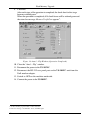
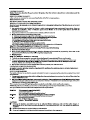
Figure 5: Connecting the VS-201YC 2x1 s-Video Switcher
1 Switch OFF the power on each device before connecting it to your VS-201YC. After connecting your VS-201YC, switch on
its power and then switch on the power on each device
2 Not illustrated in Figure 5
6
KRAMER: SIMPLE CREATIVE TECHNOLOGY