1
IntelliPack Configuration Software
Transmitter Configuration Manual
___________________________________________________________________________________________
The information contained in this manual is subject to change
without notice. Acromag, Inc. makes no warranty of any kind with
regard to this material, including, but not limited to, the implied
warranties of merchantability and fitness for a particular purpose.
Further, Acromag, Inc., assumes no responsibility for any errors
that may appear in this manual and makes no commitment to
update, or keep current, the information contained in this manual.
No part of this manual may be copied or reproduced in any form,
without the prior written consent of Acromag, Inc.
Table of Contents
1.0 INTRODUCTION ……..……………………………….
DESCRIPTION ..…………………………..………….
Key IntelliPack Software Features…..…………….
ACCESSORY ITEMS ………………………………..
IntelliPack Serial Adapter ………………………....
IntelliPack Cable………………………….…………
2.0 GETTING STARTED….………………..……………..
PROGRAM INSTALLATION………………………….
CONNECTING THE SERIAL ADAPTER…………..
MODULE CONNECTIONS……..……………………
MODULE PUSH-BUTTONS AND LEDS……………
3.0 PROGRAMMING ……..……………………………...
TRANSMITTER/ALARM CONFIG PARAMETERS..
Transmitter Configuration Parameters……………
Alarm Configuration Parameters…………………..
TRANSMITTER/ALARM CONFIGURATION……….
Before You Begin……………………………………
Starting the Program………………………………..
Creating a Configuration File………………………
Scaling Input-to-Output..……………………………
Alarm Configuration (801T-1500 Models)…..……
Testing Your Configuration…………………………
Printing Your Configuration………………………..
Saving Your Configuration………………………….
MODULE CALIBRATION…………….……………….
Module Input Calibration..…….…………………….
Reference Temperature Calibration……………….
Output Calibration…………………………………...
4.0 FIELD RECONFIGURATION.………...…………..…
5.0 TROUBLESHOOTING………………………………..
SELF DIAGNOSTICS……………..……….…………
TROUBLESHOOTING HINTS…….…………………
List of Drawings
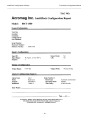
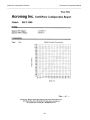
Configuration Print Page Sample………………………….
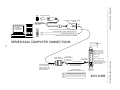
Computer to IntelliPack Connections (4501-635).……….
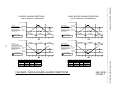
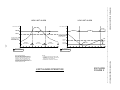
Failsafe/Non-Failsafe Alarm Conditions (4501-623)……..
Limit Alarm Operation (4501-623)…………………………
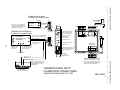
TC Input Calibration Connections (4501-699)……………
Page
2
2
3
3
3
3
4
4
4
4
4
5
5
5
5
6
6
7
8
9
10
11
11
11
12
12
14
15
16
17
17
18
1.0 INTRODUCTION
These instructions cover the software configuration of
Acromag IntelliPack Series 800T Transmitters and combination
Transmitter/Alarms. This manual provides detailed information
regarding software operation, transmitter and alarm configuration
parameters, and operating functions. Specific information
pertaining to transmitter hardware and electrical specifications is
provided in the User’s Manual that came with your module.
Please refer to the IntelliPack Alarm Configuration Manual
8500-563 for specific details on configuring IntelliPack Series
800A Alarms.
IntelliPack transmitters, alarms, and combination transmitter/
alarms are configured using the IntelliPack Configuration
Software (5030-881), Serial Interface Adapter (5030-913), USBto-RS232 Serial Adapter (4001095), and inter-connecting cable
(5030-902). These items are available as a kit by ordering the
IntelliPack Software Interface Package (Model 800C-SIP).
DESCRIPTION
IntelliPack transmitters and combination transmitter/alarms
support a variety of input types and provide isolated process
current and voltage outputs, plus an optional SPDT alarm relay.
These transmitters are configured using the Acromag Windows
95® or NT® IntelliPack Configuration Software. All transmitter
and alarm functions are reprogrammable and downloadable to
the module via the Configuration Software. In addition to
providing configurablility of all IntelliPack features, the
Configuration Software also provides controls to read input and
output values, calibrate input and output ranges, independently
control the output, monitor the alarm status, reset a latched
alarm, reset the module, plot a graph of input versus output,
document a configuration, upload the current configuration &
calibration parameters, and restore the original factory calibration.
Field reprogrammability of transmitter zero and full-scale, plus
alarm setpoint and deadband is also possible using the
IntelliPack module’s front panel push-buttons and LED’s, without
having to connect a computer. Non-volatile memory within the
IntelliPack provides secure storage of program and configuration
data.
Page
19
21
22
23
24
Each transmitter module converts an analog input signal to a
digitized value. This digitized value is then used to control a
Digital-to-Analog Converter (DAC) which provides a voltage or
current output signal. The customer-programmed alarm setpoint
is compared to this digitized value and used to control an alarm
relay (“-1500” units). The relay may have a high or low setpoint,
plus deadband configured. Relay actuation is user-selected for
failsafe or non-failsafe operation. The relay may also be
configured as latching, in which case a push button reset is
required to reset the latch (this may also be accomplished via
software control). Additionally, a programmed relay time delay
may be applied to filter transients and minimize nuisance alarms.
IMPORTANT SAFETY CONSIDERATIONS
It is very important for the user to consider the possible adverse
effects of power, wiring, component, sensor, or software failures
in designing any type of control or monitoring system. This is
especially important where economic property loss or human life
is involved. It is important that the user employ satisfactory
overall system design. It is agreed between the Buyer and
Acromag, that this is the Buyer's responsibility.
Use of this software makes configuring IntelliPack alarms and
transmitters quick and easy. There are no special commands to
memorize or complicated program routines to follow. All
configuration information is organized for you in easy to use
Windows screens. Configuration of your transmitter/alarms only
takes a few minutes with this software.
Windows 95 & NT are registered trademarks of Microsoft Corp.
-2-