1
3.2.2.1
Specifying Policy Information
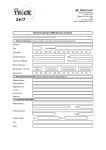
When you click ‘Policy Information’ link, the following screen is invoked:
Policy Details Section
Product ID
Mandatory
Select the product in which the Policy Holder wants to buy the Policy. The option list includes
all valid and active Products.
Product Description
Display
The system displays the description of the selected product.
Policy Number
System Generated/ User Input, Mandatory
Specify the Policy Number at the time of policy creation. The system validates the value input
for its uniqueness. The policy number cannot, however, be changed during subsequent edit
or amend operations.
When a Policy Holder subsequently contributes into this Policy that has been created, the
same Policy number has to be specified, and the Policy must be an active, valid Policy for the
transactions to be accepted.
Reference Number
16 Characters Maximum, Alphanumeric, Mandatory
Specify a unique initial identification for this Policy. The Reference Number is the initial
identification that you give to a Policy, before the Policy Number is generated.
3-3