1
TROUBLESHOOTING
Troubleshooting
Before contacting service personnel, refer to the following instructions to check and to correct
any failures.
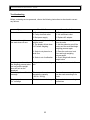
Symptom
Scale does not turn on
Possible Cause
Corrective Action
1. Dead battery
1. Replace batteries
2. Faulty electrical outlet
2. Use a different outlet
3. Bad power supply
3. Replace AC adapter
1. External object interfering
with the scale
1. Remove interfering object
from the scale
2. The display did not show
“0.0” before weighing
2. Ask the patient to get off the
scale, zero the scale and begin
weighing process again
3. Scale is not placed on a
level floor
3. Place the scale on a level
floor and begin weighing
process again
4. Scale is out of calibration
4. Check weight with known
weight value
Weighing is performed but
the weighing process takes
too long and the weight
does not lock on the
displayed
The patient is not standing
still
Ask the patient to stand still
The display shows “Over”
message
The load on the scale
exceeds the capacity
(500 lb / 220 kg)
Remove the excess weight and
use the scale according to its
limits
The display shows
“Lo” message
The batteries are discharged
Replace batteries according to
instructions
Questionable weight or
the scale does not zero
23