1
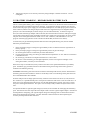
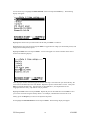
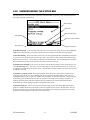
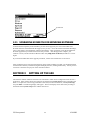
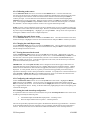
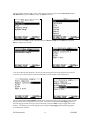
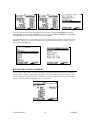
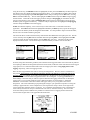
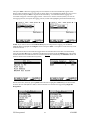
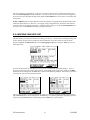
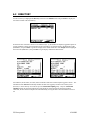
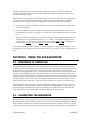
Finally, the user should be aware of a timesaving tip that is displayed when the Filename entry is
highlighted. The tip allows much easier generation of Multi-Site Designations where the Filename is
identical for several files. To “copy” the Filename from the previous file to a new entry below, simply
highlight the new Filename block, press Enter and then enter site names and site numbers. The site list
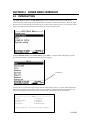
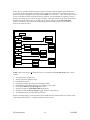
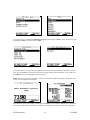
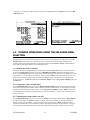
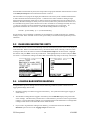
will show these blanks in the Edit site list mode as shown on the left below, but when the site list is
accessed for logging studies the actual Filename will appear to avoid confusion. This is shown at the right
below. Note that, by using this tip, two new sites have been easily added to the BLUELAKE Multi-site list
with no need to physically enter “BLUELAKE” as the Filename for each new site.
Remember that, when editing your Site list, you will have no effect on the actual files which were
previously logged to 650 memory nor on the data in the files. See Section 6 below.
5.4 650 LOGGING – “CANS” AND “CAN’TS”
The use of the 650 to facilitate the storage of data from YSI 6-series sondes has been described in some
detail in the sections above. Unfortunately, the high levels of capability and flexibility of the 650 logging
function might also be viewed as complexity which, in turn, can confuse some users about how to employ
the 650 in their particular application. This section is designed to help with any confusion that exists by
listing what “can” be done with the 650 logging system and what “can’t” be done.
5.4.1 SUMMARY OF 650 LOGGING CAPABILITIES
WITH A 650/YSI SONDE SYSTEM, THE USER CAN:
•
Log sonde sensor data to either sonde memory (if your sonde is so equipped) or 650 memory.
•
Log data as either a single point or as a continuous data stream.
•
Log data in both single point form and continuous stream form to the same file in 650 or sonde
memory.
YSI Incorporated
48
650 MDS