1
4. Front Panel Functions
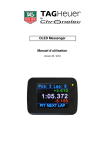
4.1. Practice Session Information
Your position
# Laps you have
completed
Your lap time or sector
times:
White by default
• If green: your best lap
• If purple: your best lap
Text Message
4.2.
Your gap with the
best time of the
session
(for every lap time or
sector time)
Gap with the best lap
time of the session and
your own best lap time
Race Session Information
Your position
Laps completed
Lap Time
Text Message
Gap with the vehicle ahead
of your position
- if Green: the gap is down
- ff Red: the gap is up
Gap with the vehicle below your
position:
- If Green: the gap is up
- If Red: the gap is down
8