1
EDS
-
Importing or exporting the setup of the EDS system
-
Setup of new devices or slaves
-
Tariff discriminators / calendars
-
Calculated variables
-
System events and alarms
-
Authentication setup
-
Web system security
-
Etc.
Without the PowerStudio Editor tool, the measurement
application cannot be configured to provide new features for
the EDS device. Consequently, the user must install the
software, thus making it possible to integrally configure the
display server and vary the settings of the display, connected
devices, alarms, etc.
4.-
-
devices: field identifying the XML as a response to the
device list request
-
id: name of each one of the devices
4.3.2.- Information about the device
4.3.4.2.- Instantaneous value of all variables
Request for detailed information about the devices. Each of
devices you want more information, should be include in the
XML sentence ?id=device1?id=device2?
Request for instantaneous values of all the variables of the
device (if information is needed about more devices, link the
other requests below with id=device?):
http://x.x.x.x/services/user/values.xml?id=device?
http://x.x.x.x/services/user/deviceInfo.xml?id=device?
http://dhcp_name/services/user/deviceInfo.xml?id=device
?
XML instructions
name.variable
This way the software knows which variable it is and what
device must be asked to find out the value of the variable.
When an incremental variable is discriminated (energy,
impulse meter or similar), the information about the
parameterised discriminator is added to the basic code:
-
name_discriminator@type_time:variable
The discriminable variables are shown in the list with an
asterisk.
4.2.- EDS variables list
If slave devices are provided, the frames sent to EDS are
identified in the same way by name and variable, as shown in
section 4.1.-.
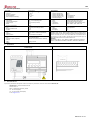
The following table shows the definition of the variables
available in EDS.
Digital inputs
Digital Input 1
Digital input 2
Digital input 3
Digital input 4
Digital input 5
Digital input 6
Digital input 7
Digital input 8
Digital Output Status
Digital Output 1
Digital Output 2
Digital Output 3
Digital Output 4
Digital Output 5
Digital Output 6
Forced Outputs Impulse
Digital Output 1
Digital Output 2
Digital Output 3
Digital Output 3
Digital Output 5
Digital Output 6
Date and time
Date and Time
Device status
Device status
XML - Status Value
DI1
DI2
DI3
DI4
DI5
DI6
DI7
DI8
XML - Force Output
DO1
DO2
DO3
DO4
DO5
DO6
XML - Impulse
DOP1
DOP2
DOP3
DOP4
DOP5
DOP6
XML - Value
VDTTM
XML - Impulse
STATUS.
XML - Meter Value
C1
C2
C3
C4
C5
C6
C7
C8
Forced Open / Close
0/1
0/1
0/1
0/1
0/1
0/1
Forced Impulse
≠0
≠0
≠0
≠0
≠0
≠0
Values
Last Server communication
Values
1
Communication OK
4
Not initialized
18
Port incorrect
34
Comm Errors
66
Device incorrect
<var> ... </var>
...
</device>
...
<devices>
-
description: description of device
-
type: device type
-
typeDescription: detailed description of the device
-
var: name of each of the variables of the device; expressed
as name.variable
4.3.3.- Information about the variable
The user can request detailed information about one or more
variables from a device and even make one single request for
the information about all the variables available in the device.
4.3.3.1.- Information about one or more variables
Request for detailed information about one or more variables
of the device (if information is needed about more variables,
link the other requests below with var=device.variable?):
http://x.x.x.x/services/user/varInfo.xml?var=device.variable?
http://name_dhcp/services/user/varInfo.xml?var=device.variab
le?
4.3.3.2.- Information about all the variables
Request for detailed information about all the variables of the
device (if information is needed about more devices, link the
other requests below with id=device?):
http://x.x.x.x/services/user/varInfo.xml?id=device?
http://dhcp_name/services/user/varInfo.xml?id=device?
<varInfo>
<var>
<id> … </id>
<title> ... </title>
<hasValue> T </ hasValue>
<hasLogger> T </ hasLogger>
<sampleMode>… </ sampleMode>
<measureUnits>… </ measureUnits>
<unitsFactor>… </ unitsFactor>
<decimals>… </ decimals>
</ var>
…
<varInfo>
-
title: brief description of the variable
-
hasValue: indicates if it is possible to request the
instantaneous value of the variable (True / False)
4.3.- XML Services
-
The requests must follow the URI standard (RFC 2396), so
the user of these requests should take this detail into account
when making such calls (especially in cases where the name
of any device contains non-ASCII characters). Take into
account that the length of the request must not under any
circumstance exceed 4000 characters.
hasLogger: indicates if it is possible to request the log of
the variable (True / False)
-
sampleMode: type of variable and mode used to group
values
-
measureUnits: variable unit
-
unitsFactor: power of 10 indicating the multiplying factor in
the log file
-
decimals: decimals of the variable
<devices>
<id> ... </id>
<devices>
<value> ... </value>
</ variable>
...
<type> ... </type>
<typeDescription> ... </typeDescription>
id: variable name in device.variable format
With this request the XML service returns the list of connected
devices to the EDS energy efficiency manager.
http://x.x.x.x/services/user/devices.xml
http://name_dhcp/services/user/devices.xml
<id> … </id>
<description> ... </description>
-
4.3.1.- Configured devices request
<values>
<variable>
<id> ... <id>
4.1.- Type of variables
-
http://dhcp_name/services/user/values.xml?id=device?
<devices>
<device>
Not only does EDS function as an excellent energy efficiency
manager for local and multi-point networks, it also has a
default XML requests server that enables it to be easily and
intuitively integrated into a SCADA or remote monitoring
system. The device, via its IP address, attends to GET and
PUT requests that can carry out different functions on the
device.
The device has a list of available variables, in accordance
with the device features. The basic code is made up of the
device name and the variables separated by a dot:
http://dhcp_name/services/user/values.xml?var=device.variab
le?
4.3.4.- Instantaneous variable value
The user can request the instantaneous values of one or more
variables, and can even request the information about all the
instantaneous data with just one request.
4.3.4.1.- Instantaneous value of one or more variables
Request for the instantaneous value one or more variables of
the device (if information is needed about more variables, link
the other requests below with var=device.variable?):
http://x.x.x.x/services/user/values.xml?var=device.variable?
</values>
-
id: identifier of the variable
-
value: value of variable at the time of the request
4.3.5.- Historical data
Request for historical data registry of an incremental variable.
Returns information on one or more variables between the
“begin” and “end” dates. Each variable for which information is
required must be included in the request as
?var=device.variable
When only the date is required, the format is DDMMYYYY;
When the date and time are required, the format is
DDMMYYYYHHMMSS. Both the date and the time must be
expressed in UTC (Universal Coordinated Time).
The grouping period can be defined by different criteria:
-
value in seconds (for example 900): value in seconds in
which the data is grouped
-
ALL the data is grouped into a single value
-
AUTO: grouping is automatic with predefined intervals
according to “begin” and “end”
-
FILE: data not grouped. returns the information as
registered in the database
-
if the period parameter does not appear in the request, it is
considered as value 0 and the data is not grouped
http://x.x.x.x/services/user/records.xml?begin=010320110000
00?end=31032011000000?var=device.variable?period=900
http://dhcp_name/services/user/records.xml?begin=01032011
000000?end=31032011000000?var=device.variable?period=
900
<recordGroup>
<period>… </ period>
<record>
<dateTime> ... </ dateTime >
<field>
<id> … </id>
<value>… </value>
</field>
</record>
…
</recordGroup>
-
recordGroup: field identifying the XML as a response to
the variable register request
-
period: recording period; time between recordings
-
record: identifies each recording (dateTime: date and time
of the sample
-
field: standard recording value (for others consult PS
manual)
-
value: value of variable at the time of the request.
4.3.6.- Historical events file
As this user manual describes, the PowerStudio / Scada
Editor makes it possible to configure events or alarms within
the EDS device and record them in the internal memory.
With the following request, the user can request the historical
events file between the dates defined. Every event that is
requested with a historical events file is defined as
?id=name_event
When only the date is required, the format is DDMMYYYY;
when the date and time are required, the format is
DDMMYYYYHHMMSS. Both the date and the time must be
expressed in Universal Coordinated Time.
http://x.x.x.x/services/user/records.xml?begin=010320110000
00?end=31032011000000?id=event_name
M98237501-03-12A