1
If the volume of BCC's is low, or not a problem, then the administrator may have to occasionally
foreword "lost messages" to their recipients. If this is not acceptable then two methods or
workarounds present themselves:
a.
Your email server may have an option to "try and use custom headers" for the recipient
information. This requires your ISP to add a special line to the top of all messages destined to
your domain which states the recipient name implicitly. This is then used by your mail server to
decide who the message is for. This system allows the email server to handle all messages
correctly, including all BCC's.
Unfortunately not many email servers have this option, and some ISP's don't like to add special
sections to messages. You will need to confirm your options with your ISP and check to options
available in your mail server.
b.
Users who join mailing lists will have to tell the email server administrator which lists they use.
The administrator can then set up rules on the email server to redirect messages coming from
known sources to the correct recipients.
The ISP does not have to have any special setting to use this method, however unknown
senders will still end up as "lost messages," but the problem will be greatly reduced.
15.
What are the other things I should be aware of relating to email systems?
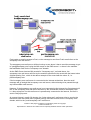
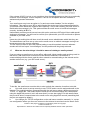
If you are using an email server at your office, with email clients sending and receiving email to
that server, that email server must exist on two different networks. One network is
communicating with the clients, and the other network is communicating to the Internet and to
another mail server (e.g. your ISP's mail server).
To do this, the email server must be able to exist on both the networks, therefore to do this:
a.
Your mail server is set-up correctly to use TCP/IP and to receive and send email to the
Internet. The email clients then communicate with the mail server using a different protocol to
TCP/IP, i.e. AppleTalk. This means that the email server and email clients can communicate
using the AppleTalk protocol, but it will mean that if you are also using PC's with email clients,
they must be able to communicate to the email server using AppleTalk as well (something that
they do not support by default).
b.
You change you TCP/IP configuration on the mail server machine manually, i.e. set-up
one configuration where you then can connect to the Internet to send and receive email. Once
Content of this page in its entirety is protected by US & UK Copyright
© 2002 Vicomsoft Ltd
Reproduction in electronic and written form is expressly forbidden without written permission.