1
SPHINX
Clearing a memory location
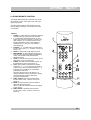
To clear a memory location you first have to select it
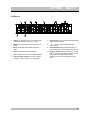
with the m STAT Ù or Ú button (3, 4).
If you now press the m DEL button (10) once, the
location is cleared and its number will disappear
from the display.
If you want to clear all memories (for instance after
you have moved to a new city) you should depress
the m DEL button (10) for at least 5 seconds. The
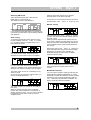
display will briefly show »ERASE?«.
If you release the button nothing will happen, but if
you hold the button depressed for another 5
seconds until the display shows »87.5 MHz« all
memories will be cleared.
If you press the m STAT Ù or Ú button (3, 4) the
display will show FREE.
RDS (Radio Data System)
Your Myth 7 is capable of receiving and evaluating
RDS information (like Radiotext, Clock-Time,
Program Service Name, Program Type) which is
transmitted simultaneously with the standard
broadcast signal. The station name is shown in the
display and automatically stored in memory,
overwriting any previously stored name.
Myth 7
With the m PROG Ù or Ú button (5, 6) you can
recall the different program types one by one. The
display briefly shows the PTY code and then the
station name transmitting this program type.
If there are no stations broadcasting the selected
Program Type the display briefly shows »NONE«.
Assigning station names
Stations not transmitting RDS code can be assigned
any name you choose. If you try to assign a name to
a RDS station the display will show »RDS DATA«
indicating that you can not assign a name.
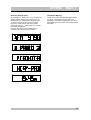
Press the m EDIT button (9). There are eight input
fields available. By repeatedly pressing the
m TUN Ù or Ú button (1, 2) you can position the
cursor at the desired position.
With the m STAT Ù or Ú button (3, 4) you then
select one of the characters A - Z, 0 - 9 or a blank
space.
O
Radiotext
A number of RDS stations transmit RADIOTEXT:
additional information about the station and the
program. Radiotext appears as a ‘moving lights
billboard’ in the display. It is transmitted character by
character so it may take some time until the entire
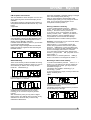
text has been received.
Radiotext display is selected by repeatedly pressing
the m DISP button (11) until the display shows the
running text.
If a station does not transmit Radiotext the display
will show »NO TEXT« for approx. 1.5 seconds after
which the station name is displayed.
P
Editing data
To edit an entry, move the cursor to the specific
position: the character will blink. Select a new
character or space (with the m STAT Ù or Ú
button).
Clock-Time
Erasing a station name
A number of RDS stations transmit Clock-Time
information. You can select this by pressing the m
DISP button (11) until the display shows the time
(__h __m). The display is updated every minute but
only if this information is transmitted.
Storing information
Program Type recognition (PTY)
RDS allows you to select FM stations by the type of
program they transmit. There are 16 standard
program categories defined (see also 7. Important
Information).
While still in input mode press the m DEL button
(10): the previous name is deleted and the cursor
jumps to the first (left) position.
To quit the input function and store the inputted
data: press the m EDIT button (9) or the
m MEM button (7).
10