1
June 2004 DelphMap™ User's Manual
Changing Profile Setup Parameters
In addition to the icons noted in Table 3, DelphMap provides a dialog box for
changing other facets of your display profile. This gives you a way to further
customize your display profile.
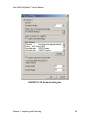
To examine and change the current profile setup values
1. In the Display Profile window, click the Profile Setup icon (right).
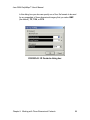
The system displays the Profile Setup dialog box (Figure 50).
Chapter 6: Displaying Image Profiles
101