1
FRONT PANEL
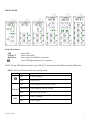
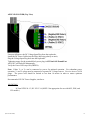
From Top to Bottom:
SPD
LNK/ACT
RJ45 Ports
Speed LED
Link/Activity LED
Auto sensing 10/100BaseT Connection
Green LED lights when Power is connected
NOTE: The top LED indicates Link/Activity (LNK/ACT), and the lower LED indicates Speed (SPD) status.
LED’s: The table below describes the operating modes:
LED
LNK/ACT
Color
Description
ON
Power is Applied.
OFF
Power is OFF.
ON
Link established, no Activity on cable.
BLINKING
Link established, Activity on cable
OFF
No link activity on cable.
ON
LINK is 100Mbps.
OFF
Link is 10Mbs.
SPD
(Revised 9/23/2009)
9