1
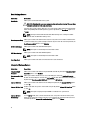
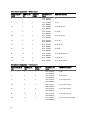
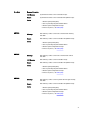
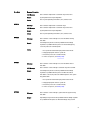
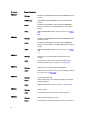
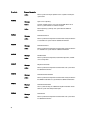
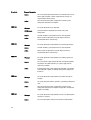
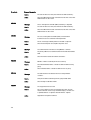
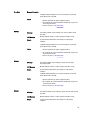
Error Code
TMP0130
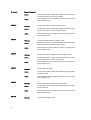
TMP0132
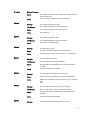
TMP0134
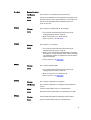
VLT0100
Message Information
Message
The control panel temperature is less than the lower warning
threshold.
LCD Message
Control panel temperature is outside of range.
Details
Ambient air temperature is too cool.
Action
Check the system operating environment.
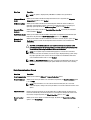
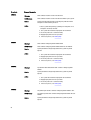
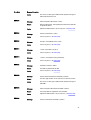
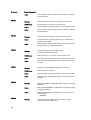
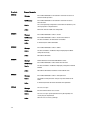
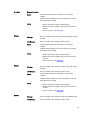
Message
The control panel temperature is greater than the upper warning
threshold.
LCD Message
Control panel temperature is outside of range.
Details
Ambient air temperature is too warm or one or more fans may have
failed.
Action
Check the system operating environment and review event log for fan
failures.
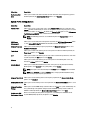
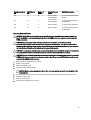
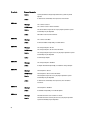
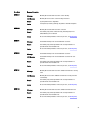
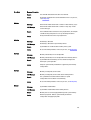
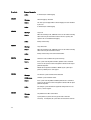
Message
The control panel temperature is outside of the allowable range.
LCD Message
Control panel temperature is outside of range.
Details
Ambient air temperature is too warm or cool.
Action
Check the system operating environment and review event log for fan
failures.
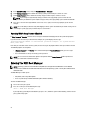
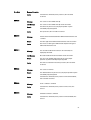
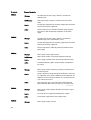
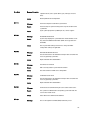
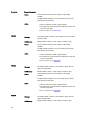
Message
Processor module <name> voltage is less than the lower warning
threshold.
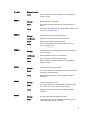
LCD Message
Processor module <name> voltage is outside of range.
Details
System hardware detected an over voltage or under voltage
condition.
If multiple voltage exceptions occur consecutively the system may
power down in fail-safe mode.
Action
1. Review system logs for power supply exceptions.
2. Remove the processor module. Inspect processor socket for
bent pins.
3. If the issue persists, see Getting Help.
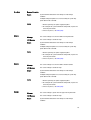
VLT0101
126
Message
Processor module <name> voltage is less than the lower critical
threshold.
LCD Message
Processor module <name> voltage is outside of range.