1
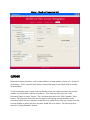
press the “Remove Selected Item” button. This will effectively remove the transaction line
from the transaction.
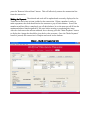
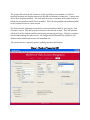
Making the Payment. The subtotal and total will be updated and accurately displayed in the
Totals section each time an item is added to the transaction. When a member is ready to
make a payment, the clerk should invite the customer to pay off their balance. Even if the
member would not like to completely pay off their balance, he or she must pay off all but the
maximum balance limit designated by the store before renting or purchasing any items.
After the clerk enters the amount tendered, he or she may press the “Make Payment” button
to display the change that should be given back to the customer. Once the “Make Payment”
button is pressed, the transaction is complete and saved in the database.
Figure 1. Check-out Transaction GUI