1
Operation
Calibrating the This setting allows you to calibrate the white color when RGBW and the DMX controller’s
White Color red, green, and blue faders are set to “255”.
1.
2.
3.
4.
5.
6.
Go to the CAL main level.
Enter the master access password (Control Panel Lock).
Go to CAL2.
Select the desired color (RED, GREN, or BLUE).
Select a desired color value (000 to 255).
Repeat the steps for additional colors.
When selecting CAL > CAL2 >, you will only be able to define the values of red, green,
and blue.
The values of RED, GREN (green), and BLUE configured from CAL > CAL2 > will define
the color temperature shown when the RGB faders are set to “255” if SET > COLR >
RGBW is active.
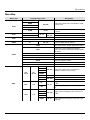
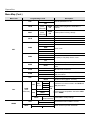
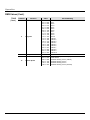
TOUR Notes
These notes clarify the way the TOUR DMX personality works.
Master Dimmer · Channel 1 controls the intensity of the currently projected color.
· When the slider is at the highest position (100%), the intensity of the output is at
maximum.
Red, Green, Blue, and · Channels 2 through 5 control the intensity ratio of each of the red, green, blue, and
amber LEDs.
Amber Color Selection
· When these channels are at the highest position (100%), the intensity of each color is
at maximum if SET > COLR is OFF.
· You can combine channels 2 through 5 to create over one trillion colors.
Color Macros · Channel 6 selects the required Color Macro.
· Channel 6 has priority over channels 2 through 6.
· Channel 1 controls the intensity of the Color Macro.
Strobe · Channel 7 controls the strobe frequency (not the intensity) of channels 2 through 6.
· Channel 7 can strobe channels 2 through 5 when not running macros, allowing the
individual faders (R, G, B, and A), as well as channel 1 (D), to control the output
intensity.
· Channel 7 can strobe channel 6 when running macros, allowing channel 6 to select
the macro and channel 1 to control the output intensity.
Auto/Custom · Channel 8 selects the preset auto programs AT.01~10 or the custom programs
PR.01~10.
· When activating the custom programs PR.01~10, you can control the Step Time and
Fade Time using channels 2 and 3, respectively.
· Channel 8 has priority over channels 2 through 7.
· Channel 9 controls the speed at which each auto program plays.
Dimmer Speed · Channel 10 selects the Dimmer mode and speed. The Dimmer mode provides four
different options to simulate the dimming curve of an incandescent lighting product.
· When Dimmer is set to OFF, the changes in the RGBA and Master Dimmer faders
are linear.
· When Dimmer is set to DIM1~DIM4, DIM1 is the fastest dimmer curve and DIM4 is
the slowest.
-18-
WELL™ Quad-M User Manual