1
Quick Installation Guide
1. Description
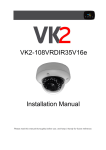
This manual applies to the VK2-1080VRDIR35V16e full HD Vandal resistant varifocal dome with IR
illumination.
• Installation Steps
Follow these steps to install the VK2-1080VRDIR35V16e on your local network (LAN):
1.
2.
3.
4.
•
Check the package contents against the list below.
Connect the VK2-1080VRDIR35V16e
Set an IP address.
Set the password.
Package Component
The system comes with the following components:
Camera Unit
•
Installation CD
Installation Guide
Accessory Kit
Template sheet
Contents in the installation CD
1.
2.
3.
4.
5.
The User’s Manual
The SmartManager User’s Manual
The VK2-ClientUser’s Manual
The SmartManager Installation software
The VK2-Client Installation software
Note: Check your package to make sure that you received the complete system, including all
components shown above.
VK2-1080VRDIR35V16e Quick User guide V1.0
3