1
If the input is gray-scale, you probably do want to use an
undercolor removal file to perform density correction, but with
100% black removal (the black removal tables should contain 0
through 255, increasing by one each line) so that the output won't
contain cyan, magenta, or yellow. The samples directory on the
distribution diskette has a UCR file called gray.ucr which has
100% black removal.
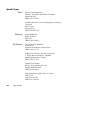
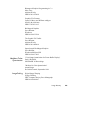
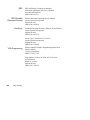
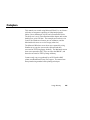
MS-DOS users can send the RTL file directly to the plotter when
generating an RTL file of type 0, 1, 2, 6, 7, and 9 through 16. To
send the file directly give the name of the output device as the
output file (for example, if your plotter is connected to your
computer via lpt1: specifying lpt1: as the output file will send
output directly to that device).
You may want to use gamma correction or a color correction file
when converting to this format. See the -G and -C options in
Chapter 8 for more information.
The best quality dither for HP RTL output is generally type 3
(Jarvis, Judice, & Ninke), with a serpentine raster, and some
dithering noise (use -ds3 10, for example).
You may want to adjust the output gamma to compensate for dot
gain when generating a HP RTL file. Typically, specifying an
input gamma of 1.0 and an output gamma of 1.8 produces good
results (-Gi 1.0 -Go 1.8). See Appendix A, Answers to
Frequently Asked Questions, for more information on dot gain.
Examples
Convert the black and white image test.wpg to an HP RTL file
for a PaintJet called test.rtl, not using a UCR file and with
dithering off:
alchemy test.wpg --r0 -d0
Image Alchemy
161