1
UPP2-X Portable in Circuit Programmer with GLCD
FIRMWARE UPDATE
The latest E-LAB programmers support downloading of new firmware into the programmer. You can
determine whether your device has this feature if you open the Device Status dialog. If this device is
updateable then in the line Update a number appears which shows the current firmware date, which is also a
part of the update file name.
With a firmware update of a programmer the entire program (Flash) is erased except a small partition which is
called “boot sector’. New firmware for the programmers can be downloaded from www.e-lab.de. These
programs cannot be executed on the PC, but must be loaded into the programmer.
USB version file: yymmdd_UPP2_X.pupd or from WEB in file: UPP2_Xupdate.zip
This must be done with the menu item Options/Download new Firmware. Please note that all update files
must be placed into the folder ISP_Updates below the programmer’s home directory. Otherwise they will not
found. The menu item opens the dialog described below.
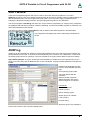
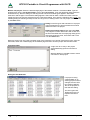
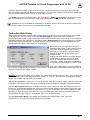
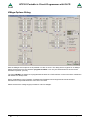
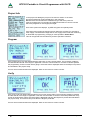
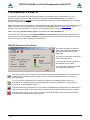
ISP/UPP Firmware Loader Dialog
The group “File state“ contains the
state of the loaded file: filename, file
size and info about the expected
target CPU.
The group “Target state“ contains the
state of the programmer.
If the traffic light shows a green the
downloading can be started.
The vertical bar shows the download
and programming progress.
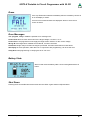
The “Open“ button opens a dialog which shows all possible firmware update files. The filenames start
with the date of creation and can be easily located. A double click loads the selected file into the
download buffer.
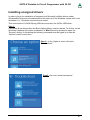
A click to the Com port button then connects the programmer’s download section to the PC’s
downloader. The downloader checks the file against the info in the programmer. If the file can’t be
accepted an error messages is raised.
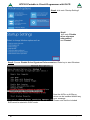
If the file matches the programmer and a connection is established the download can be started with a
click to the phone button. This process can be observed in the progress bar at the dialog’s right side.
If the downloads “hangs“ a click to the stop button aborts the operation. On problems an increase or
decrease of the external UPP voltage can help.
46 · Firmware Update
E-LAB Computers