1
BASIC OPERATIONS
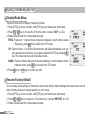
Turn On/ Off FM Radio
Under standby state, press
key, the top left corner of LCD displays " " icon,
then press
key, LCD displays "FM ON" and current FM radio frequency, FM
radio function is on. When FM radio is on, press
key, LCD displays "FM OFF",
FM radio is mute.
When FM radio is on, press
key, the top left corner of LCD displays "
"
icon, press
key to turn off FM radio and return to transceiver state. Re-start
transceiver also can exit FM radio function.
Note: To use FM radio function, user must set RADIO function on 30th menu to be ON, otherwise can not
use FM radio function normally.
CTCSS/DCS Setup
Under standby state, press
key, the top left corner of LCD displays " " icon,
press
key, LCD displays "CT" icon, it means current channel add CTCSS signal
function. Repeat above operation, LCD displays "DCS" icon, it means current
channel add DCS signal function. Repeat above operation, "DCS" icon disappears,
current channel without CTCSS/DCS signal.
CTCSS/DCS Scan
Press
key, the top left corner of LCD displays " " icon, press
key to enter into CTCSS/DCS scan.
Under this state, rotate channel switch to change scan direction. When scan the matching CTCSS/DCS
17