1
3.3 Operation Mode Setup and Display Positioning
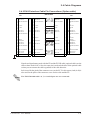
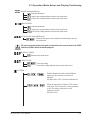
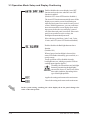
Main menu
CONTRAST (Analog RGB only)
Adjustment buttons
Applies the setting and then returns to the main menu.
Cancels the setting and then returns to the main menu.
Sets the contrast setting and then moves to the sub contrast menu.
Sub contrast R
Adjustment buttons
Applies the setting and then returns to the
contrast adjustment screen.
Cancels the setting and then returns to the
contrast adjustment screen.
Sub contrast G
Adjustment buttons
Applies the setting and then returns to the
contrast adjustment screen.
Cancels the setting and then returns to the
contrast adjustment screen.
Sub contrast B
Adjustment buttons
Applies the setting and then returns to the
contrast adjustment screen.
Cancels the setting and then returns to
the contrast adjustment screen.
BLACK LEVEL (Analog RGB only)
Adjustment buttons
Applies the setting and then returns to the main menu.
Cancels the setting and then returns to the main menu.
H-POS
Adjustment buttons
Applies the setting and then returns to the main menu.
Cancels the setting and then returns to the main menu.
V-POS
Adjustment buttons
Applies the setting and then returns to the main menu.
Cancels the setting and then returns to the main menu.
OSDH-POSITION (Analog RGB only)
Adjustment buttons
Applies the setting and then returns to the main menu.
Cancels the setting and then returns to the main menu.
3-14
FP3700-T41 User Manual